Indian companies are buying GPU servers faster than they can find somewhere to run them. An office server room was never built for a machine that draws as much power as a few homes, and the usual answer, a standard colocation rack, often turns out to be too small on power long before it runs out of space.
This guide covers what GPU colocation in India involves, the numbers that decide whether your hardware fits, and the questions to ask before you sign.
What GPU colocation is
GPU colocation means you own the GPU servers and rent everything around them: rack space, power, cooling, network and physical security in a datacenter. It is the same idea as ordinary colocation, but with very different numbers, because GPU servers draw several times the power of a normal server and turn almost all of it into heat.
The alternative is renting GPU time in the cloud. Renting is easy to start and expensive to keep. Owning the hardware and colocating it usually works out cheaper once the GPUs are busy most of the day, and it keeps your data and models on machines you control.
How much power do GPU servers draw?
This is the question that decides everything else. Manufacturers publish a maximum power rating for each system, and that is the number a datacenter plans around.
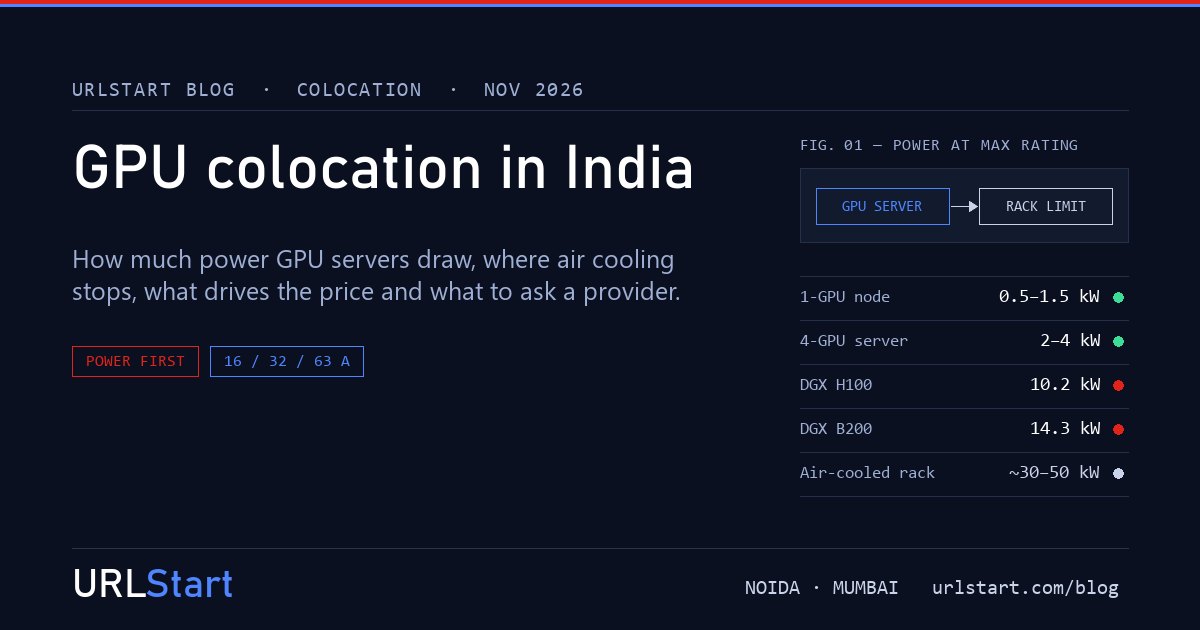
| Server | Typical height | Power at maximum rating |
|---|---|---|
| One-GPU inference node | 1U–2U | 0.5–1.5 kW |
| Four-GPU server | 2U–4U | 2–4 kW |
| NVIDIA DGX H100 / H200 (8 GPUs) | 8U | up to 10.2 kW |
| NVIDIA DGX B200 (8 GPUs) | 10U | up to 14.3 kW |
The DGX figures come from NVIDIA's own specifications. Real draw under load is usually lower than the maximum, but you cannot plan a rack on "usually". If every server in a rack hits its peak at once, the circuit has to carry it.
Compare that with a typical colocation rack, which is often sold with somewhere between 5 and 10 kW of power. A single eight-GPU server can use all of it, or more.
Power is the limit, not space
People new to GPU hosting often ask how many U they need. For GPUs, that is the wrong first question. A 42U rack could physically hold four or five eight-GPU servers. It almost never has the power to run them.
So size a GPU deployment the other way round:
- Add up the maximum power rating of every server you plan to install.
- Add the switches and storage that go with them.
- Compare the total with the power limit per rack the provider offers.
- Only then work out the space.
If the total is above the rack limit, you need either more racks with fewer servers in each, or a provider that offers high-density racks with more power per rack.
Sockets, phases and power delivery
GPU servers often have two or four large power supplies, and they need the right sockets to match. Ask the provider:
- Which sockets the rack gets: 16 A, 32 A or 63 A industrial sockets are common in Indian datacenters.
- Single or three phase. High-density racks usually use three-phase power, which carries far more load on one feed.
- Whether power is redundant. Look for two separate feeds, A and B, backed by UPS on both, so a failure on one side does not stop the server. Plug one power supply into each feed.
Cooling: where air stops working
Every watt a GPU draws becomes heat in the room. Up to a point, cold air pushed through the front of the rack handles it. Industry sources put the practical ceiling for air cooling at roughly 30 to 50 kW per rack, depending on the design.
Above that, datacenters move to liquid cooling: rear-door heat exchangers, or direct-to-chip cooling where liquid runs through plates on the GPUs themselves. The newest rack-scale systems, such as NVIDIA's GB300 NVL72, draw over 120 kW in a single rack and are designed for liquid cooling from the start.
For most Indian businesses colocating a few GPU servers, air cooling is enough, as long as the provider can spread the load across racks. If you are planning a dense training cluster, ask early whether the facility supports liquid cooling at all, because many do not.
Deep racks for long servers
GPU servers are long and heavy. Check the cabinet size before you ship anything:
- A 1200 mm deep cabinet takes long GPU chassis with room behind for power and network cabling. Shallower racks may not close.
- Check the weight limit per rack and floor tile if you are filling a whole rack with GPU servers.
- Plan rear cable management for the thick power cables and high-speed network links GPU nodes use.
What drives the price of GPU colocation
Most providers quote GPU colocation rather than publishing a price, because power varies so much. The price comes down to:
- Power, either a fixed allocation or metered by the kWh you actually use. This is usually the biggest line.
- Space, from a few U to a half or full rack.
- Network, especially if you move large datasets in or serve models to many users.
- Remote hands, for reseating a card or swapping a disk when you cannot be there.
Metered power helps GPU buyers more than most, because training runs come and go. You pay for the kWh used rather than the peak you might reach. Our colocation pricing guide explains each line on a typical Indian quote.
Questions to ask before you sign
- What is the power limit per rack, and can you go higher on a high-density rack?
- Which sockets and phases are available, and are there two separate feeds?
- Is power metered or fixed, and what does each extra kW cost?
- Up to what density is the room air-cooled, and is liquid cooling available?
- How deep are the cabinets, and what is the weight limit?
- What network speed and cross-connects can you get for datasets?
- Who does remote hands at night, and how quickly?
- Which facility is it, what tier, and who runs it?
Our checklist for choosing a colocation facility in India covers the facility questions in more depth.
GPU colocation with URLStart
We offer GPU colocation in our Tier IV datacenters in Noida and Mumbai. Cabinets are 600 × 1200 mm and up to 52U tall. Power is N+N and UPS-backed, delivered through PDUs on 16, 32 or 63 A sockets, single or three phase, and metered. Racks come with 10 kW by default, and more power is available when your hardware needs it, including for eight-GPU servers: we size the circuit and check the cooling for your exact servers. Our racks are air-cooled; if you need liquid cooling, we will tell you plainly whether we can host it.
Send us your server model, quantity and power rating, and we will size the circuits and rack space with you, usually the same day.
Sources
- NVIDIA DGX H100 / H200 user guide, NVIDIA
- NVIDIA DGX B200 user guide, NVIDIA
- Scaling AI data center cooling for high-density servers, TechTarget
- AI rack density's real limits, Data Center Knowledge