Save 20% on all Cloud VPS plans — use code HAPPY20 at checkout
99.95% uptime SLA 24/7 support Since 2019 Tier IV · Noida
Client Area
Tally on Cloud · TallyPrime · ERP 9 · GST ready From ₹584/mo

Tally on Cloud —
TallyPrime from anywhere, with everyone.

Host TallyPrime or Tally ERP 9 on our secure cloud and use it from any device — laptop, desktop, tablet or phone — with real-time multi-user access, an optional daily backup add-on, GST compliance and 99.95% uptime. Free migration, 24/7 Tally-certified support.

✓ Any device✓ Real-time multi-user✓ Daily backup add-on✓ Free migration
TallyPrime · cloud session3 users online
Gateway of TallyCompany · FY 2026-27
Sales this month₹18,42,500
Purchases this month₹11,28,300
GST payable₹1,24,500
Last backupToday · 02:00
AccessAny deviceRDP · browser
UsersMulti-userreal time
BackupDailyautomatic
Fig. 01 TallyPrime cloud session — three users online, backup add-on enabled
00At a glance

What is URLStart Tally on Cloud?

    TL;DR
  • TallyPrime or Tally ERP 9 hosted on a private server, with multi-user access from any device
  • Daily backup add-on and GST-ready; same sizes and prices as Cloud VPS, from ₹584/month on annual billing
  • Your data stays in India, in a Tier IV datacenter in Noida, Delhi NCR
  • 99.95% uptime SLA · support 24/7

Tally on Cloud runs your licensed TallyPrime or Tally ERP 9 on a URLStart server so your accountant, owner and branch offices work on the same company data at the same time — from any device, with nothing installed on the client. Daily automatic backups, GST-ready, payroll, inventory and reports exactly as on the desktop, 99.95% uptime and Tally-certified engineers on support around the clock. From ₹584/month.

Facts as of October 2026 · urlstart.com
Software
TallyPrime · ERP 9
Users
Multi-user · real time
Access
Any device · RDP / browser
Backups
Daily · optional add-on
Compliance
GST · payroll · TDS
Uptime
99.95%
From
₹584/mo annual
01Plans

Sized by users. Free setup.

4 GB serves a small firm with two or three users; move up as companies and users grow.

Prices per month · switch currency in the header
Tally Cloud-4 GB
RAM4 GB
vCPU2 vCPU
Storage50 GB NVMe SSD
Bandwidth20 TB · unmetered*
₹749/mo Billed monthly
Tally Cloud-6 GB
CA firms
RAM6 GB
vCPU3 vCPU
Storage75 GB NVMe SSD
Bandwidth20 TB · unmetered*
₹999/mo Billed monthly
Tally Cloud-8 GB
RAM8 GB
vCPU4 vCPU
Storage100 GB NVMe SSD
Bandwidth20 TB · unmetered*
₹1,299/mo Billed monthly
Tally Cloud-12 GB
RAM12 GB
vCPU5 vCPU
Storage150 GB NVMe SSD
Bandwidth20 TB · unmetered*
₹1,799/mo Billed monthly
Tally Cloud-16 GB
RAM16 GB
vCPU6 vCPU
Storage200 GB NVMe SSD
Bandwidth20 TB · unmetered*
₹2,299/mo Billed monthly
Tally Cloud-24 GB
RAM24 GB
vCPU7 vCPU
Storage300 GB NVMe SSD
Bandwidth20 TB · unmetered*
₹3,299/mo Billed monthly
Tally Cloud-32 GB
RAM32 GB
vCPU8 vCPU
Storage400 GB NVMe SSD
Bandwidth20 TB · unmetered*
₹4,499/mo Billed monthly
Tally Cloud-48 GB
RAM48 GB
vCPU9 vCPU
Storage600 GB NVMe SSD
Bandwidth20 TB · unmetered*
₹6,299/mo Billed monthly
Tally Cloud-64 GB
RAM64 GB
vCPU10 vCPU
Storage800 GB NVMe SSD
Bandwidth20 TB · unmetered*
₹7,999/mo Billed monthly
Free setup & migrationDaily backup add-on available99.95% uptime SLA24/7 Tally expert support* fair-usage bandwidth
02How it works

How Tally on Cloud works.

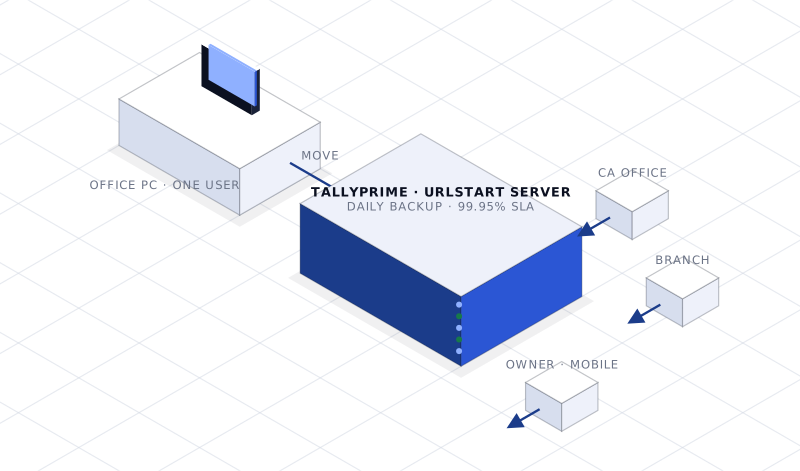
Isometric scene: Tally moving from a single office PC to a URLStart server reached by the CA office, a branch and the owner on mobile
Fig. Same Tally, different place — one server, every user
01

Choose a plan

Pick a size for your users and companies. We set up the server and Tally for you.

02

We migrate your data

Send us your Tally data; our certified team moves it over and verifies it — free.

03

Work from anywhere

Log in from any device. Your team works on live data together; backups run every night.

03Why Tally on Cloud

Everything your business needs in one cloud package.

Any device, anywhere

Use TallyPrime from laptop, desktop, tablet or smartphone — at the office, at home, or on the go. No client-side install.

Layer · Access

Real-time multi-user

Multiple team members work simultaneously on the same company data without conflicts.

Layer · Collaboration

Daily backup add-on

Add automatic off-server backups to any plan: the last 48 hours kept on the daily add-on, the last weekly copy on the weekly add-on where offered. Restorable on request.

Layer · Data

GST, payroll, inventory

Manage salaries, PF, ESI, TDS on salary, leave tracking and payslips — everything TallyPrime does, on cloud.

Layer · Compliance

Secure by default

Isolated server, encrypted access, DDoS protection in the path and a Tier IV datacenter in India.

Layer · Security

Tally-certified support, 24/7

Engineers who know Tally, not just servers — for setup, migration and configuration help.

Layer · Support
04Who it is for

Perfect for every business that runs on Tally.

CA & accounting firms

Serve many client companies from one place with per-user access.

6–8 GB · many companies

SMEs & traders

Owner, accountant and store on the same books in real time.

4 GB · 2–3 users

Multi-branch businesses

Branches post to one company data set — no syncing spreadsheets.

8 GB+ · multi-user

Manufacturing & inventory

Stock, job work and GST filings from a server that never goes home.

6–8 GB

Remote teams

Work-from-home finance teams with a proper audit trail.

Any size

Businesses replacing a desktop

Retire the one PC everyone depends on, and its unreliable backups.

4 GB to start
05Specifications

Tally on Cloud specifications.

The datasheet, in one table. If a line matters to your workload and is not here, ask before you order.

ItemSpecification
SoftwareTallyPrime and Tally ERP 9 (your licence, hosted by us)
UsersMulti-user, real-time, simultaneous work on the same company data
AccessAny device — Windows, macOS, tablet, phone — via RDP or browser; nothing installed on the client
BackupsDaily off-server backup add-on, 48-hour retention (weekly add-on where offered); restore on request
ComplianceGST, payroll (PF, ESI, TDS), inventory — everything TallyPrime does
Memory4 GB (2–3 users) to 8 GB+ (CA firms, multi-branch)
SecurityIsolated server, encrypted access, DDoS protection, Tier IV facility in India
Setup & migrationFree — our Tally-certified team installs and moves your data
Uptime SLA99.95%
Support24/7 Tally-certified engineers
DatacenterTier IV, Noida, Delhi NCR
06SLA & support

Uptime, support and billing — what you can hold us to.

The commitments behind the plan, stated once so there is no small print to find later.

99.95% uptime SLA

Measured monthly on network and power availability. Credits for breaches are defined in our Terms & Conditions — the SLA is a contract term, not a slogan.

Availability

Support 24/7, by engineers

Phone, WhatsApp, live chat and tickets from the client area — answered around the clock by people with console and IPMI access to the node.

Support

Monitoring and mitigation

Network and node monitoring at all hours; DDoS scrubbing in the path; emergency mitigation in under 30 seconds for customers under attack.

Operations

Snapshots and backups

On-demand snapshots on every VPS; scheduled backups optional. Restore from the panel or ask support.

Data

Billing you can read

INR pricing, GST invoices with our UP GSTIN, UPI / cards / net banking / PayPal / crypto. Monthly or longer terms; cancel any time.

Billing

Refunds and cancellation

Cloud VPS, dedicated servers and add-ons are non-refundable except for faults on our side, per the Refund Policy. Cancel from the client area at least 7 days before renewal.

Policy
07Security & residency

Security and data residency.

Where your data physically is, who can touch it, and what stands between it and the internet.

Data stays in India

Every server is in our Tier IV datacenter in Noida, Delhi NCR. Nothing is replicated abroad unless you do it.

Residency

Physical security

Access-controlled floor, CCTV, staffed security and locked cabinets, operated by the facility; our cage inside it.

Facility

Isolation

KVM isolation with dedicated resources — no container oversubscription, no noisy neighbours.

Compute

DDoS scrubbing in the path

Volumetric, protocol and application-layer mitigation on ingress, included on every plan.

Network

Your keys, your access

Root or administrator is yours from minute one. We access a node only on your ticket, and IPMI sessions are logged.

Access

Fault-tolerant power and cooling

Tier IV 2N paths with UPS and generator backing — a single failure does not reach your server.

Facility
08Migration

Moving to URLStart — free, and done by us.

Tell us where you are hosted now. We do the rest.

01

Share access

Give our engineers access to the current server or a backup. We audit what runs there and plan the move.

02

We copy and test

Data, databases and configuration are moved to your new URLStart server and tested against the live site before anything changes.

03

Cut over

DNS is switched at a time you choose. The old server stays up until you confirm — no downtime window you did not agree to.

11Network & datacenter

One network. Owned edge, scrubbed transit.

Traffic enters through redundant edges with DDoS scrubbing in the path, crosses a 10 Gbps core, and lands on our hardware in our Tier IV datacenter in Noida. Every plan gets the same path.

10Gbps
Core network
99.95%
Uptime SLA
Tier IV
Datacenter class
24/7
Engineers on support
IN-DELNoida, Delhi NCRTier IV · one facility
PowerFault-tolerant2N power & cooling
Network10 Gbps coreDDoS scrubbed
HandsRemote hands 24/7URLStart engineers
12Questions

Frequently asked.

Everything you need to know about running Tally on the cloud.
01What is Tally on Cloud?
Tally on Cloud means your TallyPrime or TallyERP 9 software is hosted on a remote cloud server managed by URLStart. Instead of running Tally on your local computer, you connect to our cloud server via the internet — using Remote Desktop (RDP) or a browser — and work in Tally exactly as you would locally, but from any device, anywhere.
02Do I need to buy a Tally license separately?
Yes. You need to have a valid TallyPrime or Tally ERP 9 license. We provide the cloud hosting environment — the server, storage, security, and access infrastructure. If you already own a Tally license, you can bring it to our cloud. We can also help you purchase a new Tally license if needed. Contact our team for bundled pricing options.
03How do I access Tally on Cloud?
You can access Tally on Cloud through Remote Desktop Protocol (RDP) — the same technology used for remote computer access. On Windows, use the built-in Remote Desktop Connection app. On macOS, download Microsoft Remote Desktop. On mobile, use the RDP app. We also provide a web-based browser access option. We'll send you login credentials after setup.
04Is my financial data safe on the cloud?
Yes. Your Tally data lives on a server in a Tier IV datacenter in India behind our DDoS-scrubbed network. Access is over encrypted Remote Desktop with per-user Windows logins and strong passwords, and Tally’s own user security controls what each person can see and do. Data stays in India.
05How are backups handled?
Daily automatic backup of your entire Tally data is available as an add-on on every plan — add it at checkout or later from the client area. Backups are copied to separate storage every night and the last 48 hours are retained; a weekly backup add-on, where offered, keeps the most recent weekly copy. Restores are done on request, and you can take a manual backup from Tally at any time.
06Can I migrate my existing Tally data to the cloud?
Yes, and it's completely free. Our team will migrate your existing Tally company data — including all vouchers, ledgers, inventory, and configuration — to the cloud with zero downtime. The migration is typically completed within a few hours. You can continue working on your local Tally while we set up the cloud environment, then switch seamlessly.
07Can multiple users in different cities access the same Tally company?
Yes, this is one of the biggest advantages of Tally on Cloud. All users connect to the same cloud server and work in the same Tally company simultaneously — whether they're in Delhi, Noida, Bangalore, or working from home. Changes made by one user are immediately visible to all others. No more syncing or data transfer between locations.
08Can I print directly from Tally on Cloud to my local printer?
Yes. We configure printer redirection as part of your RDP session, so invoices, vouchers and reports print directly to any printer connected to your local computer — just like using Tally on a local machine.
09What happens if my internet connection drops while working?
Tally on Cloud sessions are resilient to brief disconnects — when your connection returns, you can simply reconnect to the same session and continue exactly where you left off, since Tally keeps running on the server even while you're disconnected.
10Can I integrate Tally on Cloud with other business tools?
Yes. Since Tally on Cloud runs the same TallyPrime/Tally ERP 9 you already use, all standard Tally integrations — GST filing utilities, banking modules, and third-party add-ons compatible with your Tally version — continue to work normally.
11How many users can access Tally on Cloud simultaneously?
The number of concurrent users depends on your plan and matches your Tally multi-user license. We size the server's RAM and CPU to your expected concurrent user count during onboarding — contact our team if you need to add more seats later.
BLOGRelated reading

Guides on this.

Written by the engineers who run the servers. All posts →

Tally in GST season: keeping a three-person team productive when everyone needs the books — URLStart blog cover

Tally in GST season: keeping a three-person team productive when everyone needs the books

The weeks around GSTR filing are when a single-PC Tally setup breaks down. What changes with a hosted multi-user server, and how to prepare a month…

Tally · 22 Oct 2026 · 3 min read
Read→
Tally remote access options compared: Tally.NET, VPN to the office, or a hosted server — URLStart blog cover

Tally remote access options compared: Tally.NET, VPN to the office, or a hosted server

The three ways to reach your Tally books from outside the office, what each needs, what it costs, and which one suits a single owner, a CA, or a team.

Tally · 25 Oct 2026 · 3 min read
Read→
Multi-user Tally setup checklist: licence, logins, permissions, backups — URLStart blog cover

Multi-user Tally setup checklist: licence, logins, permissions, backups

Everything that has to be in place before three or more people can work in the same Tally company file on a server at once, in the order to do it.

Tally · 22 Oct 2026 · 3 min read
Read→

Ready to deploy?

Root shell in about a minute. Talk to an engineer first if you'd rather size it together.

✓ 99.95% uptime SLA ✓ Cards · UPI · Net banking · PayPal · Crypto ✓ Cancel anytime