The Linux vs Windows VPS question usually gets answered with opinions about which system is "better". That is the wrong question. A VPS is there to run a specific piece of software, and that software almost always decides the operating system for you. This guide goes through the things that matter in practice: workloads, licence cost, resource overhead, day-to-day management and security, and ends with a decision table you can use directly.
What is the actual difference between a Linux VPS and a Windows VPS?
Both are the same kind of server. On a KVM platform, a Linux VPS and a Windows VPS get the same virtual CPU, memory and disk from the same physical machine. The only difference is the operating system installed on that virtual disk.
That one difference changes a lot downstream:
- How you connect. Linux is managed over SSH, a text terminal. Windows is managed over Remote Desktop (RDP), which gives you a full graphical desktop.
- What runs on it. Some software exists only for Windows. Some runs best, or only, on Linux.
- What it costs. Most Linux distributions are free. Windows Server needs a licence from Microsoft, which someone has to pay for.
- How much of the server the OS itself uses. Windows Server takes noticeably more RAM and disk before you install anything.
One thing worth checking before you buy anywhere: Windows needs full virtualisation such as KVM. Container-based "VPS" products (OpenVZ, LXC) share the host's Linux kernel and cannot run Windows at all. Our post on KVM, OpenVZ and LXC explains how to tell which one you are being sold.
Which workloads need Linux, and which need Windows?
Start here, because this settles most cases in one step.
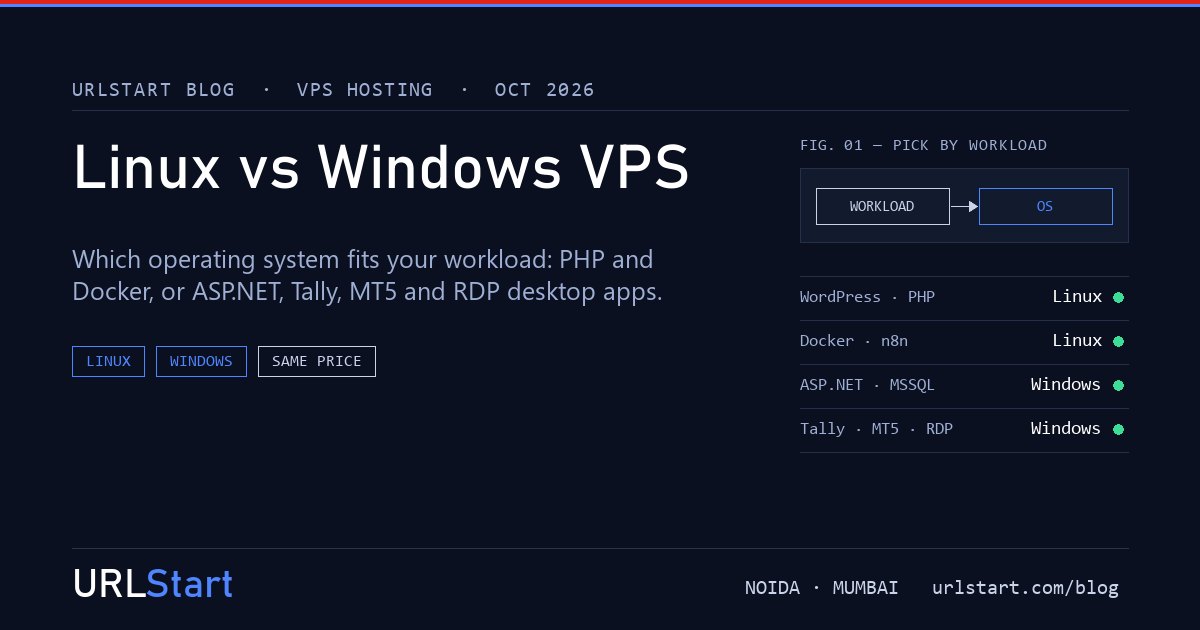
Workloads that belong on Linux:
- PHP websites, WordPress, WooCommerce, Laravel, Magento
- Docker and container stacks, including Docker Compose setups
- Node.js, Python, Go and Ruby applications
- Nginx or Apache web servers, MySQL, MariaDB, PostgreSQL, Redis
- Most game servers (Minecraft, Rust, Palworld, FiveM and others ship Linux builds)
- n8n and most self-hosted open-source tools
- cPanel, which runs only on Linux
These all run on Windows in some form, but they are built and documented for Linux first. Guides, error messages and community answers assume Linux, and you will be working against the grain on Windows.
Workloads that need Windows:
- ASP.NET Framework sites (the older .NET 4.x line) on IIS
- Microsoft SQL Server, especially when an existing application expects it
- Tally (TallyPrime or Tally ERP 9) for remote or multi-user access
- MetaTrader 4 and MetaTrader 5, plus cTrader, for running expert advisors around the clock
- Windows desktop applications that several people need to reach over Remote Desktop
- Browser automation or tools that only ship as a Windows
.exe
The grey area: modern .NET (version 6 and later) runs well on Linux, and SQL Server has a Linux edition. If you are starting a new .NET project, Linux is a real option. If you are moving an existing ASP.NET Framework application, stay on Windows. Plesk runs on both, which our Plesk install guide covers.
How much does the Windows licence add to the cost?
Windows Server is commercial software, and its licence is paid for in one of two ways on a VPS:
- Included by the host. The licence cost is built into the monthly price.
- Bring your own licence (BYOL). You already own a suitable Windows Server licence and apply it to the server.
Many hosts charge more per month for a Windows plan than for the same Linux plan, so compare the two prices side by side rather than assuming they match.
At URLStart, a Windows VPS and a Cloud VPS for Linux are the same nine sizes on the same hardware, at the same price. The Windows Server 2019 or 2022 licence is included in every Windows plan, and you can bring your own if you prefer. Plans start at ₹749 a month on monthly billing, or ₹584 a month on annual billing, for 4 GB RAM, 2 vCPU and 50 GB of storage.
There is one licence cost a Windows plan does not cover: Remote Desktop Services (RDS) CALs. Windows Server allows two administrator RDP sessions at once. If more people need to log in at the same time, for example a team using Tally, each extra user needs a licence. Our RDS CAL guide explains how many you need.
Does Windows need a bigger VPS than Linux?
Yes, for the same job. A minimal Linux server can idle in a few hundred megabytes of RAM. Windows Server with its desktop typically uses one to two gigabytes before your software starts, and the system files and updates take a meaningful slice of the disk.
In practice that means:
- 4 GB RAM is a comfortable Linux server for a busy WordPress site or a small Docker stack. On Windows it suits one or two MT4/MT5 terminals or a single light application.
- 8 GB RAM is where a Windows VPS starts to feel roomy for IIS plus SQL Server Express, or for Tally with a few users.
- Disk: keep at least 20 GB free on a Windows server for updates and temporary files. Windows updates fail in unhelpful ways when the disk is nearly full.
CPU overhead is smaller than RAM overhead, but Windows does run more background services. If you are unsure, size one step larger on Windows and resize later if the server stays quiet.
Which is easier to manage?
This depends on the people, not the systems.
Linux is managed from the command line. Installing a web stack, renewing certificates and reading logs are all text commands, which makes them easy to script, repeat and document. If your team is comfortable with SSH, Linux is quicker to look after. If nobody has used a terminal before, the first few weeks are a learning curve, and a control panel such as cPanel or Plesk can help.
Windows is managed through Remote Desktop, so it looks like a normal Windows PC. Installing software means downloading an installer and clicking through it. People who already use Windows at work are usually productive on a Windows VPS within minutes. The trade-off is that point-and-click work is harder to repeat exactly, and Windows Update needs more attention: reboots, scheduled install windows and the occasional update that needs a retry.
Neither is "maintenance free". Both need updates, backups and someone checking them. If you would rather hand that work over, ask about managed support before you buy. Our post on managed vs unmanaged VPS walks through what that covers.
Is Linux more secure than Windows?
Neither operating system is secure or insecure on its own. Servers get compromised through a handful of avoidable causes, and those apply to both:
- Weak or reused passwords on SSH or RDP
- Login ports exposed to the whole internet with no limit on attempts
- Missing updates, both for the operating system and the software on top
- Old applications or plugins left running long after anyone uses them
What differs is the shape of the work.
On Linux, the usual first steps are SSH keys instead of passwords, a firewall such as UFW, and fail2ban to block repeated login attempts. Web servers on Linux are a frequent target of PHP and plugin vulnerabilities, so keeping PHP and WordPress up to date matters most. Our PHP upgrade guide shows how to do that safely.
On Windows, RDP is the most attacked service. A long unique password, account lockout, a non-default RDP port or an IP allowlist, and regular Windows Update cover most of the risk. Our first twenty minutes on a Windows VPS goes through it step by step.
Both URLStart platforms run behind the same standard DDoS protection at our Tier IV datacenter in Noida, Delhi NCR. That protects the network edge. It does not replace a strong password or a patched server.
Linux vs Windows VPS: the decision table
Find your main workload in the left column. If you run two workloads that point different ways, the usual answer is two smaller servers rather than forcing one onto the wrong system.
| Workload | Choose | Why | |---|---|---| | WordPress, WooCommerce, PHP sites | Linux | Built and documented for Linux; cPanel is Linux only | | Docker, Docker Compose, containers | Linux | Native containers; Windows needs extra layers | | Node.js, Python, Go apps | Linux | Standard deployment target, lighter on RAM | | New .NET 6+ project | Either | Modern .NET runs well on Linux | | ASP.NET Framework (4.x) on IIS | Windows | Framework runs only on Windows | | Microsoft SQL Server for an existing app | Windows | The app usually expects SQL Server on Windows | | Tally for remote or multi-user access | Windows | Tally is a Windows application | | MT4, MT5, cTrader expert advisors | Windows | Terminals are Windows software | | Desktop apps shared by a team over RDP | Windows | Remote Desktop with multiple user sessions | | Game servers (Minecraft, Rust, Palworld, FiveM) | Linux, usually | Linux builds are standard and lighter | | Team has no command-line experience | Windows, or Linux with a panel | Pick what your people can maintain |
What about shared hosting?
If you are comparing a VPS against shared hosting, note that URLStart does not currently sell shared hosting to new customers. For a single website, the smallest Linux Cloud VPS is the closest option, and our shared hosting to VPS guide covers when the move makes sense.
FAQ
Is a Windows VPS more expensive than a Linux VPS?
At many hosts it is, because the Windows Server licence costs money. At URLStart the two are priced the same, with the Windows licence included. Extra Remote Desktop user licences (RDS CALs) are a separate cost if more than two people need to log in at once.
Can I run WordPress on a Windows VPS?
Yes, using IIS with PHP and MySQL, or through Plesk. It works, but it uses more RAM than the same site on Linux, and most WordPress guides and plugins assume Linux. Unless something else on the server needs Windows, choose Linux for WordPress.
Can I run Docker on a Windows VPS?
Docker on Windows Server mainly runs Windows containers. Most public images are Linux images, which need extra virtualisation layers to run on Windows. For a Docker stack, a Linux VPS is the straightforward choice.
Do I need Windows for MT4 or MT5?
Yes, in practice. MetaTrader terminals are Windows applications, and a Windows VPS lets them run with your expert advisors around the clock. Our MT5 setup guide covers the setup.
Can I switch from Linux to Windows later?
Yes, by reinstalling the server with the other operating system. A reinstall wipes the disk, so back up your data first and move it across afterwards. It is not an in-place conversion.
How much RAM does a Windows VPS need?
For one or two trading terminals or a single light application, 4 GB works. For IIS with SQL Server, or Tally with a few users, start at 8 GB. Windows itself uses one to two gigabytes before your software runs.
Which is better for a beginner?
The one that matches what you already know. If you use Windows every day and need to run a Windows program, a Windows VPS over Remote Desktop will feel familiar. If you want to host a website and are willing to learn a few commands, Linux is lighter and better documented for that job.
Do Linux and Windows VPS run on the same hardware at URLStart?
Yes. Both use the same KVM nodes, the same nine sizes from 4 GB to 64 GB RAM, and the same Tier IV datacenter in Noida, Delhi NCR. The operating system is the only difference.