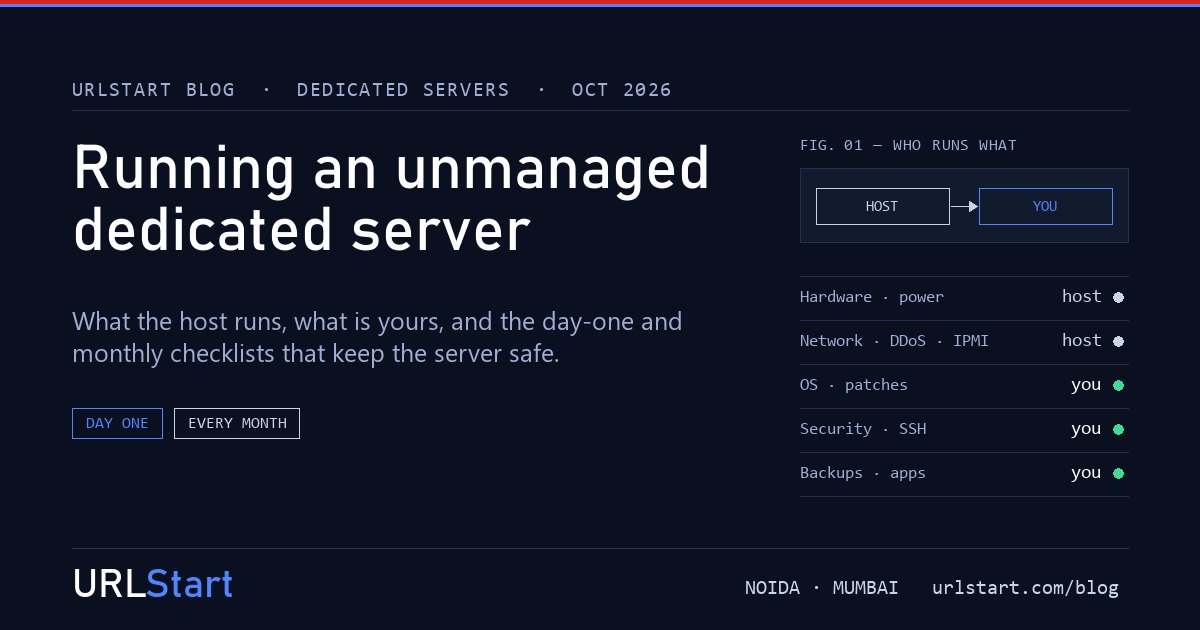
An unmanaged dedicated server is the cheapest way to get a whole machine to yourself, and the reason is simple: the provider does less. The hardware, the power, the network and the remote console are theirs. The operating system and everything you put on it are yours.
That split is fine, often ideal, as long as someone on your team actually owns the second half. This post is the list of what that second half contains. If you are still deciding between managed and unmanaged, our managed vs unmanaged comparison covers the decision; this one assumes you have chosen unmanaged and want to run it properly.
What the host does, and what you do
On an unmanaged dedicated server, expect the line to fall roughly here.
The provider handles:
- the physical server, and replacing failed disks, memory or power supplies
- power, cooling and the building
- the network up to your server's port, and DDoS protection on it
- the remote console (IPMI), so you can reach the server even when its operating system cannot
- reinstalling an operating system image when you ask
You handle:
- the operating system: updates, kernel patches, reboots
- security: users, SSH, firewall, intrusion prevention
- backups, and proving they restore
- every application: web server, database, PHP, control panel, game server
- monitoring, and reacting when something goes wrong at 2 a.m.
The provider will usually tell you when a disk is failing in hardware terms. They will not notice that your database is full, your certificate expired, or your WordPress was hacked. That is the meaning of unmanaged.
Day one: the setup checklist
Do these before the server goes into production. On a fresh Linux install, the whole list takes about two hours.
- Log in through IPMI once. Confirm the remote console works and note how to reach it. It is your way back in if you lock yourself out of SSH.
- Create a normal user with sudo, and stop logging in as root.
- Switch SSH to keys. Add your public key, test a login with it, then set
PasswordAuthentication noin the SSH configuration. Password logins are what most automated attacks guess at. - Turn on a firewall. Allow only what the server serves: SSH, and 80 and 443 for a web server. Everything else stays closed.
- Install fail2ban or an equivalent, so repeated failed logins are blocked.
- Apply all updates and reboot, so you start on the current kernel.
- Enable automatic security updates for the operating system packages.
- Check the disks and RAID. Confirm the RAID array is healthy and set up an email alert for when it degrades. A RAID 1 array that has quietly been running on one disk for months is not protecting anything.
- Set up backups to somewhere else: another server or object storage, never the same machine.
- Set up basic monitoring: is the server up, is the disk filling, is the load normal. Even a free uptime check is better than finding out from your customers.
On Windows Server, the same list applies with different tools: a non-default administrator, Windows Update set to install automatically, the Windows firewall limited to RDP and your services, and RDP restricted to known addresses where you can.
Every month: the upkeep
The monthly work is small. The danger is that it slips because nothing seems wrong.
- Patch and reboot. Automatic updates install packages but do not reboot for a new kernel. Plan a reboot window. October 2026 had six Linux kernel bugs with public root exploits; a patched-but-not-rebooted kernel is still the vulnerable one.
- Test a restore. Restore one file or one database from backup to a scratch location. A backup you have never restored is not a backup yet.
- Read the disk health. Check SMART data and the RAID status. Disks usually warn before they fail.
- Check free space on every partition, especially logs and databases.
- Review access. Remove users and SSH keys for people who have left. Rotate shared passwords.
- Update your applications: PHP, the web server, the database, the CMS and its plugins, the control panel. Most break-ins come through these, not the operating system.
When unmanaged is the wrong choice
Unmanaged works when someone has the time and the skill to own the lists above. It goes wrong when the server is set up by a contractor who then leaves, or by a developer who is busy shipping features. Nobody patches it, and a year later it is running a vulnerable PHP and an expired certificate.
If that sounds like your team, pay for managed support or a control panel that handles more for you. The money is small next to cleaning up a compromised server.
Running an unmanaged dedicated server with URLStart
Our dedicated servers are unmanaged by default: we run the hardware, the network, DDoS protection and the remote console, and you get full root with any operating system or a custom ISO. Every server comes with full IPMI access, so you can reinstall, recover a broken network setting or watch it boot without opening a ticket. Our support engineers are there around the clock when you want a second opinion, and managed support is quoted separately if you would rather hand the list over.