"DDoS protection included" appears on almost every VPS offer now. It sounds the same everywhere. It isn't. Two VPS plans with the same badge can behave completely differently on the day someone actually attacks you.
Here is what a DDoS-protected VPS really means, the questions to ask before you rely on it, and the limits of any protection.
What DDoS protection on a VPS does
A distributed denial-of-service attack floods your server with more traffic than its network connection, or the server itself, can handle. The traffic comes from thousands of machines at once, so blocking one address does nothing. Our guide to DDoS attacks explained covers the different kinds.
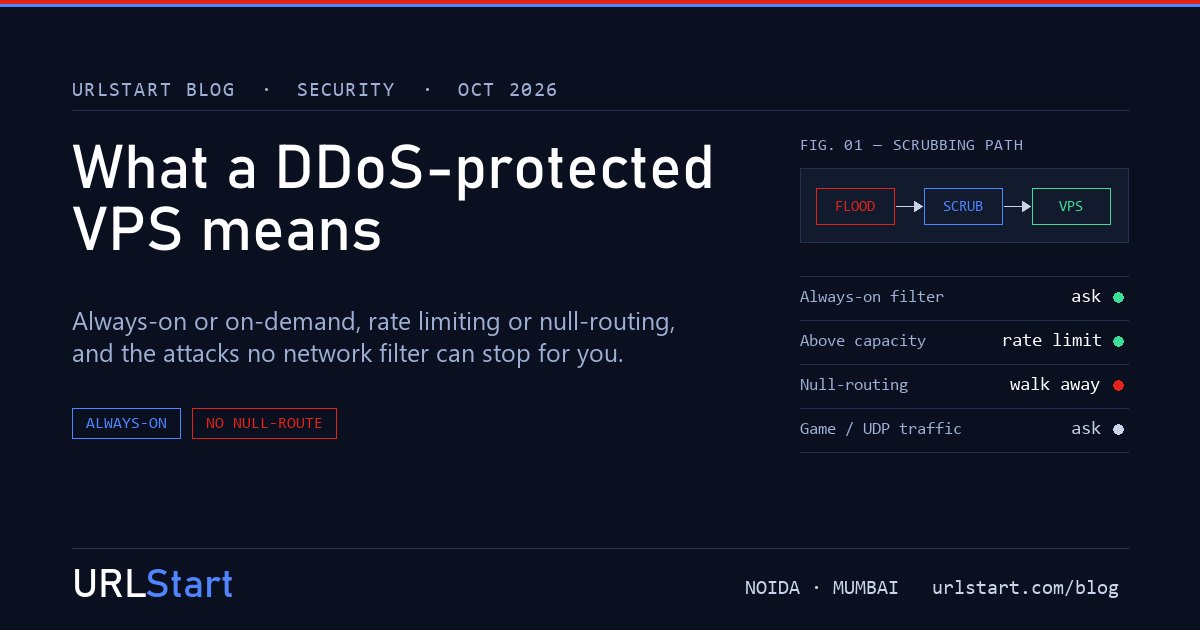
DDoS protection moves the fight upstream. Traffic heading for your VPS passes through filtering equipment on the provider's network, often called scrubbing. Attack traffic is dropped there. Normal traffic carries on to your server. Done well, your users never notice an attack happened.
The important part: this happens on the provider's network, not on your VPS. A firewall on the server itself can't stop a flood, because by the time the traffic reaches the server, the connection to it is already full.
Three questions that separate real protection from a checkbox
1. Is the filtering always on, or switched on when an attack is detected?
Always-on protection sends every packet through filtering all the time. There is no gap at the start of an attack.
On-demand protection watches your traffic and diverts it to filtering only after it detects an attack. Detection takes time, from seconds to minutes. For a website that may be acceptable. For a game server or a trading platform, the first minute of every attack is downtime.
2. What happens when an attack is bigger than the capacity?
Every protection has a limit. Ask what happens above it. There are two common answers:
- Rate limiting: traffic above the limit is slowed or partly dropped, but your server stays reachable.
- Null-routing, also called blackholing: the provider stops routing all traffic to your IP address to protect their own network. Your server goes offline until the attack stops.
Null-routing is the warning sign. It protects the provider, not you, and it does exactly what the attacker wanted. If a plan's answer to a big attack is to null-route you, it is not really protection.
3. Does it understand your traffic?
Filtering web traffic is different from filtering game traffic. Many games use UDP, and generic filters can mistake normal game packets for an attack, or let game-specific attacks through. If you run a game server, ask whether the protection handles your game's traffic. Our post on DDoS protection for game servers explains why that matters on wipe day.
What DDoS protection does not do
Network protection stops floods. It cannot fix problems that look like normal traffic:
- Application-layer attacks, which are many ordinary-looking requests to an expensive page such as search, login or checkout. Each request is valid, so the network lets it through, and your application falls over. Defences here are caching, rate limits in your web server or application, and a web application firewall.
- A hacked server. If an attacker gets in through a vulnerable plugin or an unpatched PHP, no amount of DDoS filtering helps. Patching and backups do.
- An undersized server. If a normal busy day already uses all your CPU, a small spike of real visitors will take it down too.
Checklist before you rely on a DDoS-protected VPS
- Is filtering always on?
- What happens above capacity: rate limiting or null-routing?
- Is the filtering run by the provider, or a third party they resell?
- Does it cover your protocol, such as web, game or other UDP traffic?
- Is it included in the price, or charged per attack or per gigabit?
- Is your own application ready, with caching, rate limits and a patched stack?
Our DDoS-protected VPS
Every URLStart plan sits behind always-on DDoS scrubbing on our own network. There is no switch to turn on and no extra charge. Floods are dropped before they reach your port. Above the scrubbed capacity, traffic is rate-limited so your server stays reachable; we never null-route it. See the DDoS-protected VPS for plans, or the DDoS-protected dedicated server for a whole machine behind the same edge.